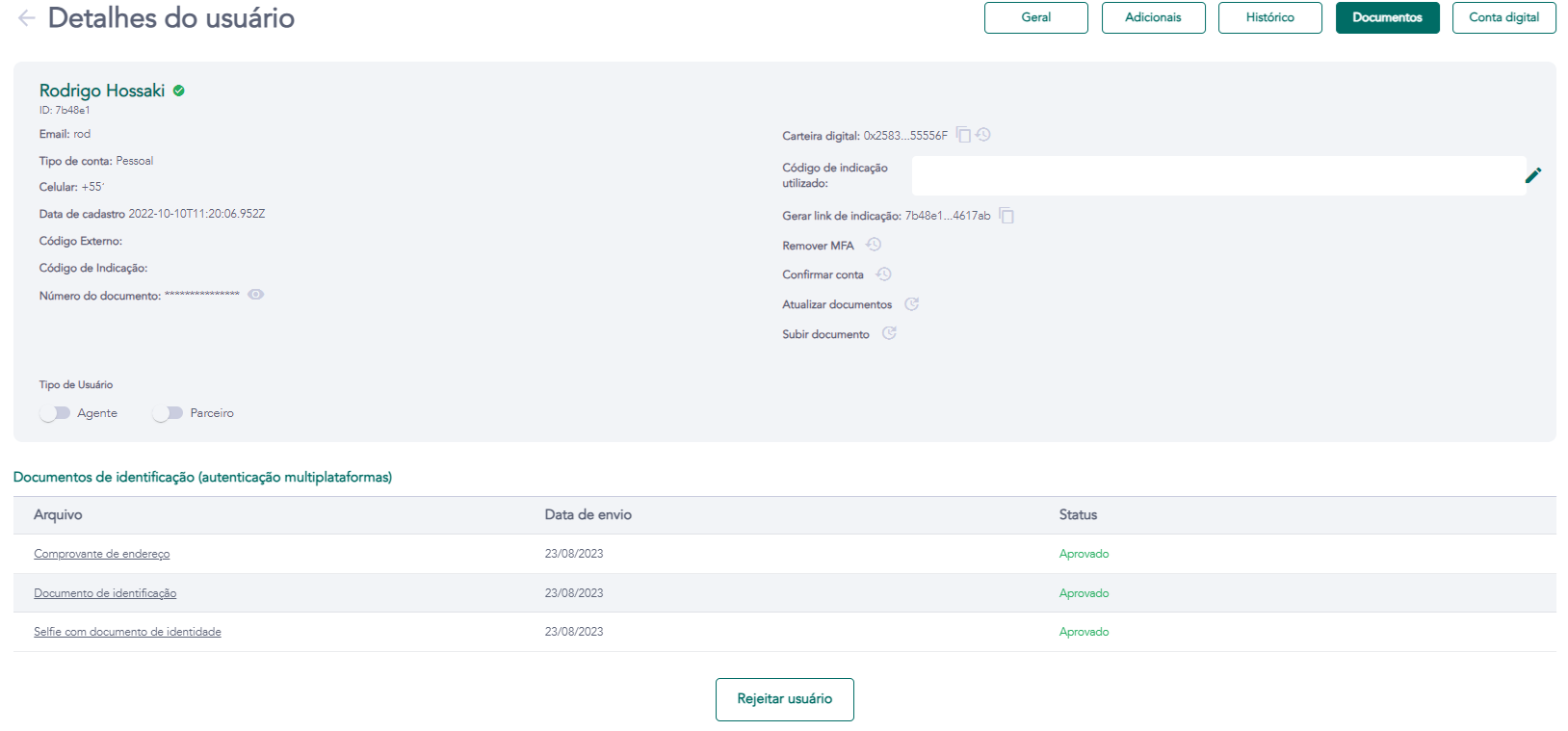
Details - Documents
Access requirements
- Permission (module):
viewUserto view;uploadKycCpmto update documents - License/Feature:
USER_KYCorCROWDFUNDINGenabled on the tenant - Menu container: GENERAL → Users group → User list → eye icon → Documents tab
What it is / when to use
The Documents tab consolidates all files submitted by the user during registration and digital account opening. It is the central point for KYC review: the administrator can approve or reject each document individually, and the system notifies the user to resend when necessary. Use this tab to validate identity documents, proof of address, and corporate documentation.
Document fields and statuses
| Field | Description |
|---|---|
| Document type | E.g.: National ID, Driver's license, Passport, Proof of address, Articles of incorporation |
| File | Preview or download link for the submitted document |
| Status | PENDING (awaiting review), APPROVED (approved), REJECTED (rejected) |
| Upload date | Date and time of the user's upload |
| Rejection reason | Filled in by the admin upon rejection; sent by email to the user |
Administrative actions
| Action | What it does | Permission |
|---|---|---|
| Approve document | Marks the document as APPROVED; advances the KYC review | uploadKycCpm |
| Reject document | Marks as REJECTED and sends a notification to the user for resubmission | uploadKycCpm |
| Update documents | Opens an upload modal for the admin to replace a document on behalf of the user | uploadKycCpm |
Resubmission flow via support
When the user cannot upload directly on the platform (technical issue, unsupported format, file size exceeded):
- The user informs support about the difficulty.
- Support asks the user to send the documents through another channel (email, chat, WhatsApp).
- The administrator uses the Update documents action to upload the files on behalf of the user.
- After upload, the document status becomes
PENDINGand awaits normal approval.
Accepted formats
Accepted formats and maximum sizes depend on the tenant configuration. Generally: JPG, PNG, and PDF up to 10 MB per file.
Business rules
- The tab only appears if the tenant has
USER_KYCorCROWDFUNDINGenabled. - Approval of all required documents is a prerequisite for digital account opening (for tenants with digital banking) and for account confirmation (
APPROVEDstatus). - Rejecting a document automatically sends a notification email to the user with the reason provided by the administrator.
Related screens