
User list
Main screen
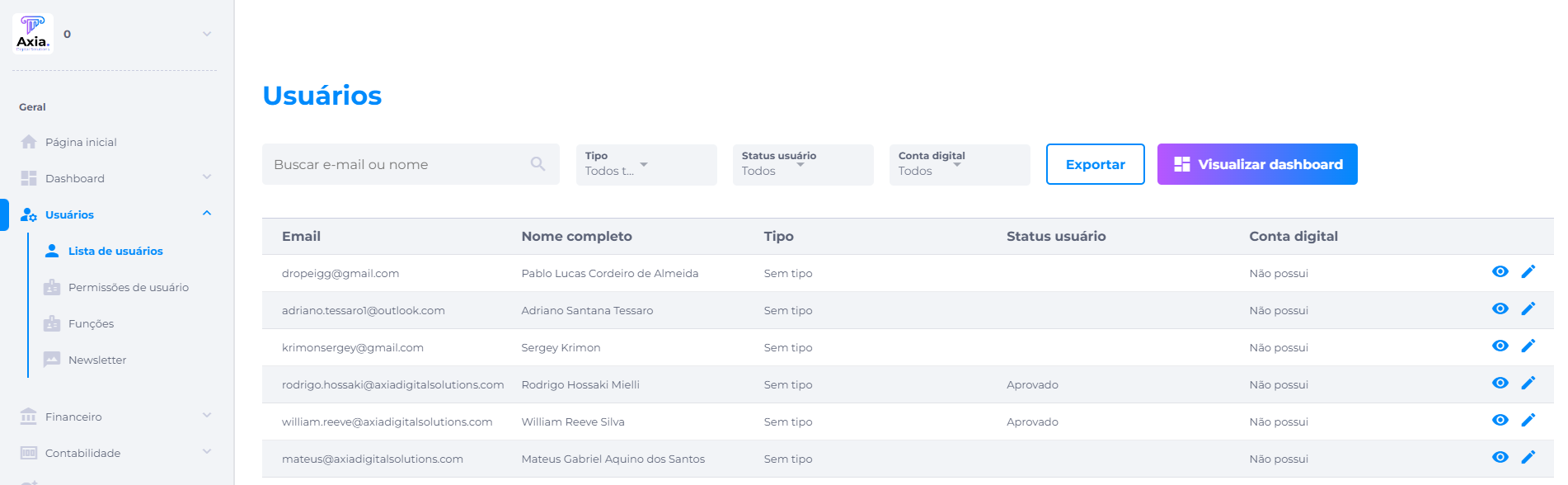
Contains a list of all users registered on the platform.
For user management, there is a user search field and filters to be used with more specific information, such as: by type, user status, or digital account.
Based on the search, the administrator can export the displayed data by clicking the side Export button.
Alongside it, the administrator can use the dashboard to check data and information related to the platform's users for administrative analysis by clicking the View dashboard button.
On the users screen, a list is displayed with the following information:
- Email;
- Full name;
- Type (None / Agent / Partner);
- User status (Approved / Pending / Rejected);
- Digital account (Approved / Disapproved / Processing / Suspended).
The administrator has the option to view the user's details by clicking the View icon.
In user details, the administrator will have access to various information on the main screen and also in each section: General / Additional / History / Documents / Digital Account.
.png)
Changing a user's email
The Edit button is used only to change the user's email when requested.
However, the email should only be changed after the administrator follows important security verifications and validations, confirming that the requester is indeed the user.
.png)