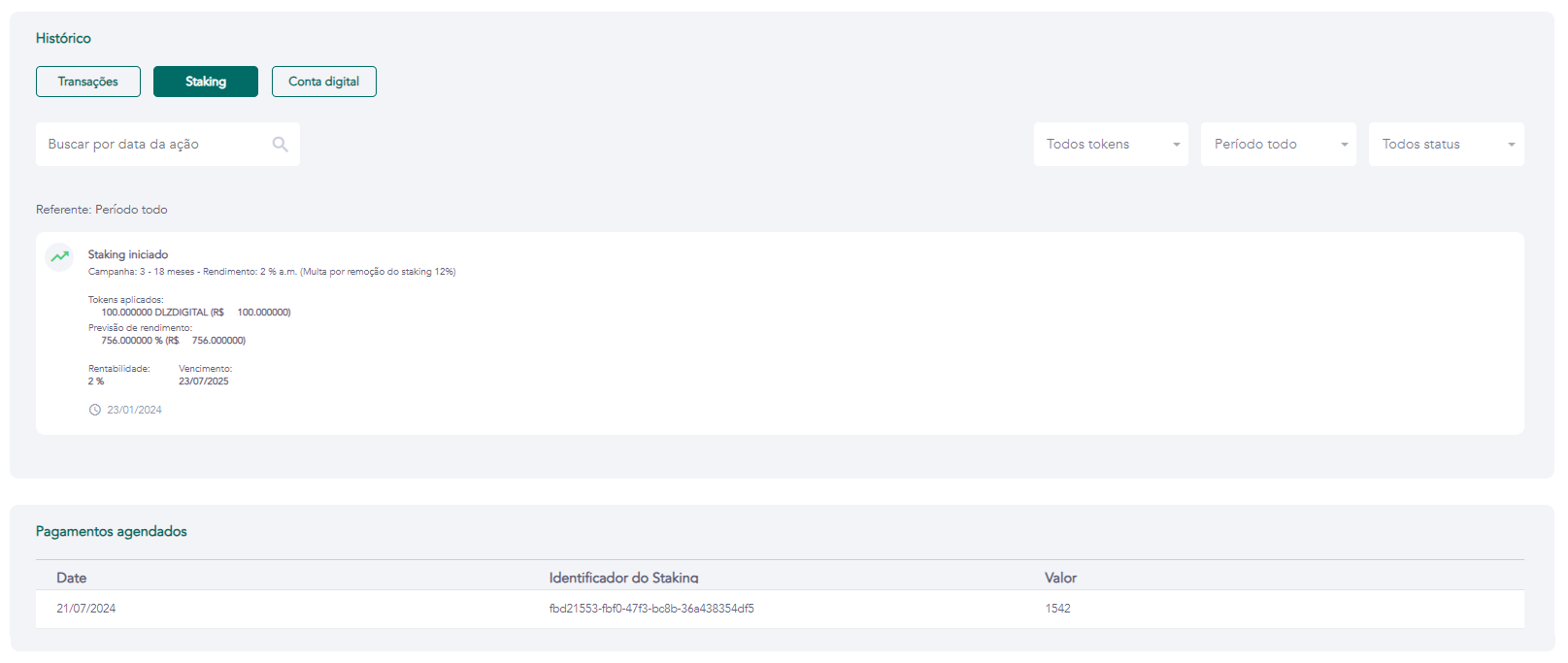
History — Staking
Access requirements
- Permission (module):
viewUser - License/Feature:
STAKING_PERMISSIONenabled on the tenant - Menu container: GENERAL → Users group → User list → eye icon → History tab → Staking sub-tab
What it is / when to use
The Staking sub-tab displays all of the user's staking applications — active, closed, and scheduled. Use it to check the status of an application, confirm generated returns, identify early termination (with penalty applied), or track the schedule of future payments.
Fields displayed per application
| Field | Description |
|---|---|
| Status | ACTIVE (in progress), FINISHED (closed on schedule), CANCELLED (early termination) |
| Campaign / Token | Campaign name and applied token |
| Applied amount | Quantity of tokens invested in the campaign |
| Return rate | Monthly reward percentage configured in the campaign |
| Estimated return | Total estimated earnings at the end of the period |
| Start date | Date the staking was applied |
| Maturity date | Staking contract end date |
| Early exit penalty | Penalty percentage in case of early termination |
Scheduled payments
For each active staking application, all monthly payments scheduled per the campaign contract are listed:
| Field | Description |
|---|---|
| Staking ID | Unique identifier for the application |
| Next payment date | Scheduled date for the next return credit |
| Amount to receive | Return amount to be credited on the scheduled date |
Payments are processed automatically by the staking scheduler on the scheduled date. The credit appears in the user's History → Transactions once processed.
Related screens